止まることのない、
コンテンツを。
Content that
never stops.
PulseSignは、クラウド型のデジタルサイネージCMS。数千台のスクリーンを、ひとつのダッシュボードから。伝えたいことを、伝えたい瞬間に、伝えたい場所へ。あなたのコンテンツは、止まりません。 PulseSign is a cloud-based digital signage CMS. Manage thousands of screens from a single dashboard, and deliver the right content to the right place — the moment it matters. Your message never goes dark.
「PulseSign」という名前。 The story behind the name.
PulseSignは、Pulse(鼓動・脈拍)とSign(サイネージ・看板・信号)を組み合わせた名前です。 PulseSign joins Pulse — heartbeat, rhythm, the live energy of the city — with Sign — signage, display, the act of communicating.
鼓動・脈拍Heartbeat
生きている、リアルタイム、街の鼓動。常に動き、更新され続けるコンテンツ。Alive, real-time — the pulse of the street. Content that keeps moving and updating.
サイネージ・表示・伝達Signage
デジタルサイネージ、表示、伝達。見る人に確かに届くメッセージ。Digital signage, display, communication — a message that truly reaches the people in front of it.
街に息づく、生きたディスプレイ。 Displays that breathe with the street.
ひとつのプラットフォームで、
完全な制御を。
One platform.
Total control.
スクリーン運用のすべてを、ひとつのプラットフォームに。 Everything it takes to run your screens — in one platform.
メディアライブラリMedia Library
Media Libraryメディアライブラリ
画像・動画・HTMLコンテンツをひとつのライブラリに集約。クラウドストレージへ直接アップロードし、すべての画面で再利用できます。Keep images, video, and HTML in one organized library. Files upload straight to cloud storage and can be reused across every screen.
レイアウトエディターLayout Editor
Layout Editorレイアウトエディター
画面を複数のゾーンに分割し、それぞれに異なるコンテンツを配置。ドラッグ操作だけで縦型・横型どちらのディスプレイにも対応できます。Split any screen into multiple zones and drop different content into each. Drag-and-drop design works for both portrait and landscape displays.
プレイリスト管理Playlists
Playlistsプレイリスト管理
コンテンツを並べ替えて再生順と表示時間を自由に設定。ループ再生にも対応し、一度作れば複数の画面に割り当てられます。Sequence your content, set the duration for each item, and loop it on repeat. Build a playlist once and assign it to any number of screens.
コンテンツスケジューラーContent Scheduler
Content Schedulerコンテンツスケジューラー
数週間先のキャンペーンを事前に設定。曜日・時間帯のルールを決めて、全体・グループ・画面単位で配信先を指定。すべてをひとつのカレンダーから管理できます。Plan campaigns weeks ahead. Set day-of-week and dayparting rules, then target the whole fleet, a group, or a single screen — all from one calendar view.
再生レポート&分析Reports & Analytics
Reports & Analytics再生レポート&分析
どのコンテンツが、いつ、どの画面で再生されたかを自動で記録。再生回数・稼働率・時間帯別の傾向をレポートで可視化し、CSVで書き出して次の一手に活かせます。Know exactly what played, when, and where. Automatic proof-of-play logs turn into clear reports on plays, uptime, and daypart trends — export to CSV to prove ROI.
デバイス監視&遠隔操作Device Monitoring & Remote Control
Device Monitoringデバイス監視&遠隔操作
全デバイスのオンライン/オフライン状態をダッシュボードで一目で把握。応答が途絶えた端末は自動で検知。再起動・キャッシュクリア・スクリーンショット取得まで、遠隔で操作できます。See every device's online/offline status at a glance — unresponsive screens are flagged automatically. Reboot, clear the cache, or grab a screenshot remotely, without leaving your desk.
3ステップで、
すぐに始められます。
Up and running
in three steps.
複雑な設定は、いりません。つないで、作って、配信するだけ。 No complex setup. Connect, build, broadcast.
スクリーンを接続するConnect your screens
Connect接続する
AndroidデバイスにPulseSignアプリを入れて、画面のQRコードをスタッフアプリでスキャンするだけ。1分足らずで接続完了です。Install the PulseSign app on any Android device, then scan the on-screen QR code with the staff app — connected in under a minute.
レイアウトを作成するBuild your layouts
Build作成する
ドラッグ&ドロップで、画像・動画・HTMLコンテンツを自在にレイアウト。コーディングは、いりません。Drag and drop images, video, and HTML content into any layout. No code required.
配信開始Publish and go live
Go live配信開始
1台でも、1000台でも。公開すれば、すべての画面が自動で最新に。ネットワークが切れても、キャッシュ済みコンテンツで再生は止まりません。One screen or a thousand — publish once and every display updates itself automatically. Even if the network drops, cached content keeps playing.
3つのアプリが、
ひとつにつながる。
Three apps.
One connected system.
管理はブラウザで。設置はスマホで。再生はプレイヤーで。実際の画面をご覧ください。 Manage in the browser, set up from your phone, play on any screen. Here's what it actually looks like.
CMS 管理画面The CMS
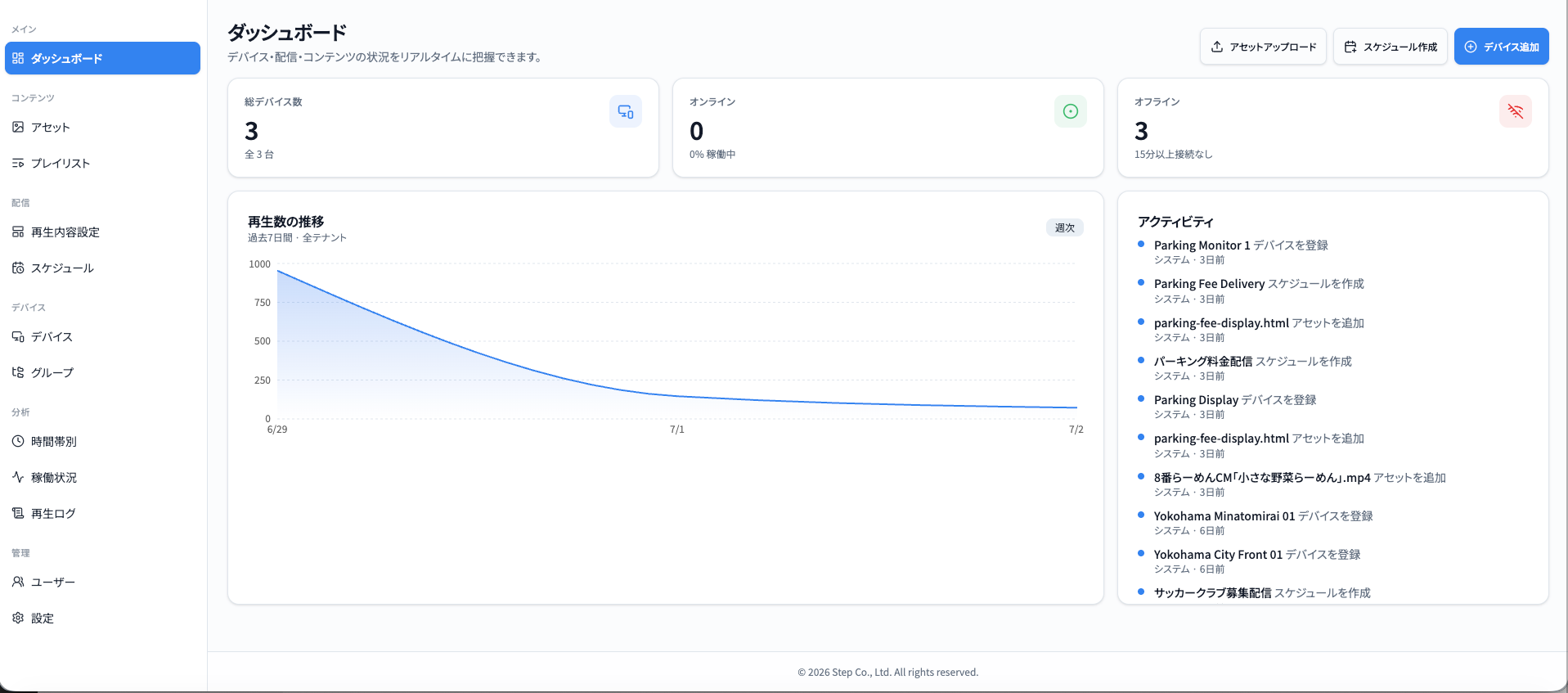
コンテンツ・スケジュール・デバイスを、ブラウザだけでまとめて管理。ダッシュボードを開けば、全スクリーンの稼働状況と再生実績がひと目でわかります。Manage content, schedules, and devices — all from the browser. Open the dashboard and see your whole fleet's status and playback history at a glance.
プレイヤーアプリThe player app
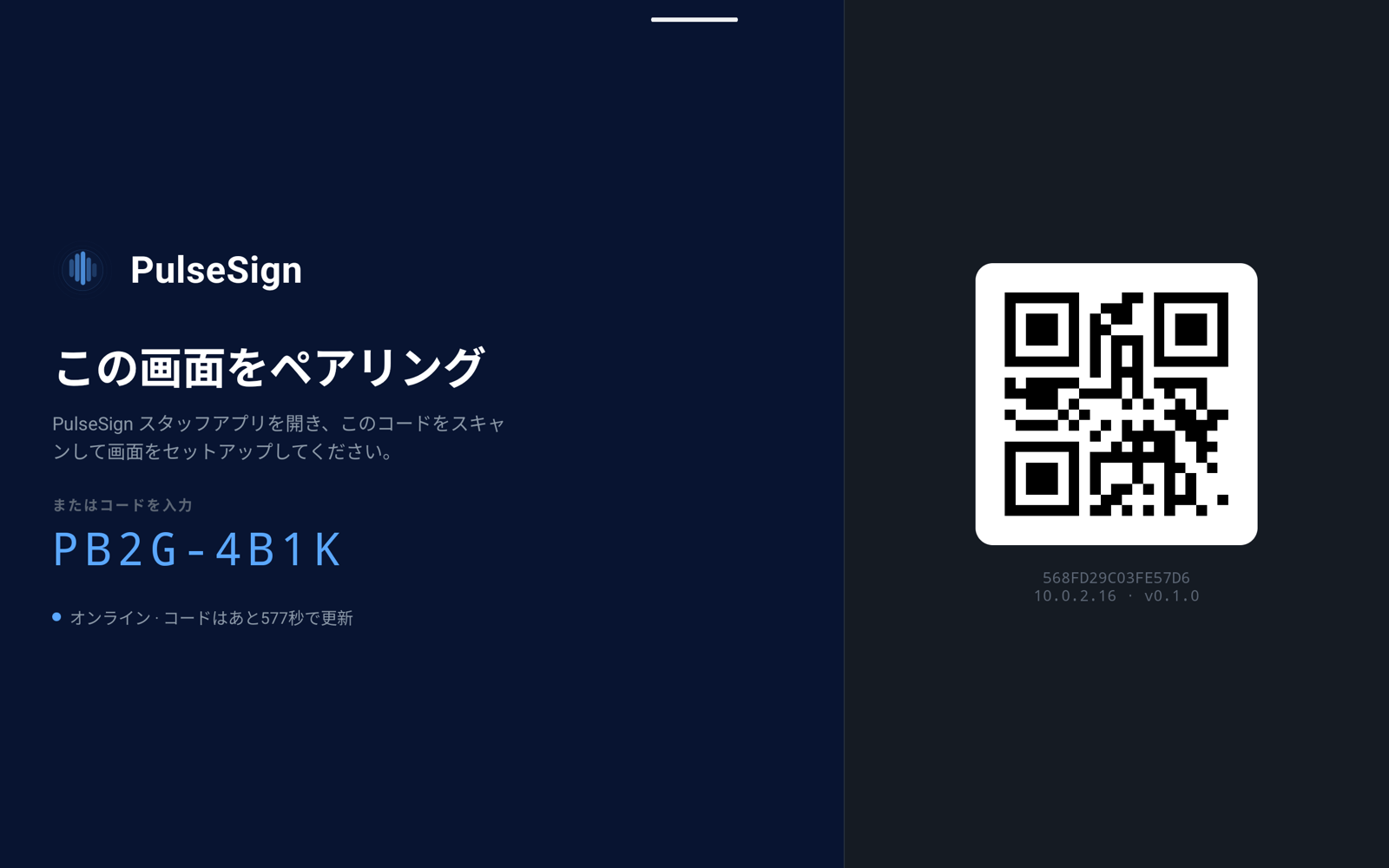
Androidデバイスが、そのままサイネージプレイヤーに。起動するとQRコードが表示され、ペアリングを待つだけ。あとは自動で再生が始まります。Any Android device becomes a signage player. On launch it shows a QR code, waits to be paired, then starts playing on its own.
スタッフアプリThe staff app
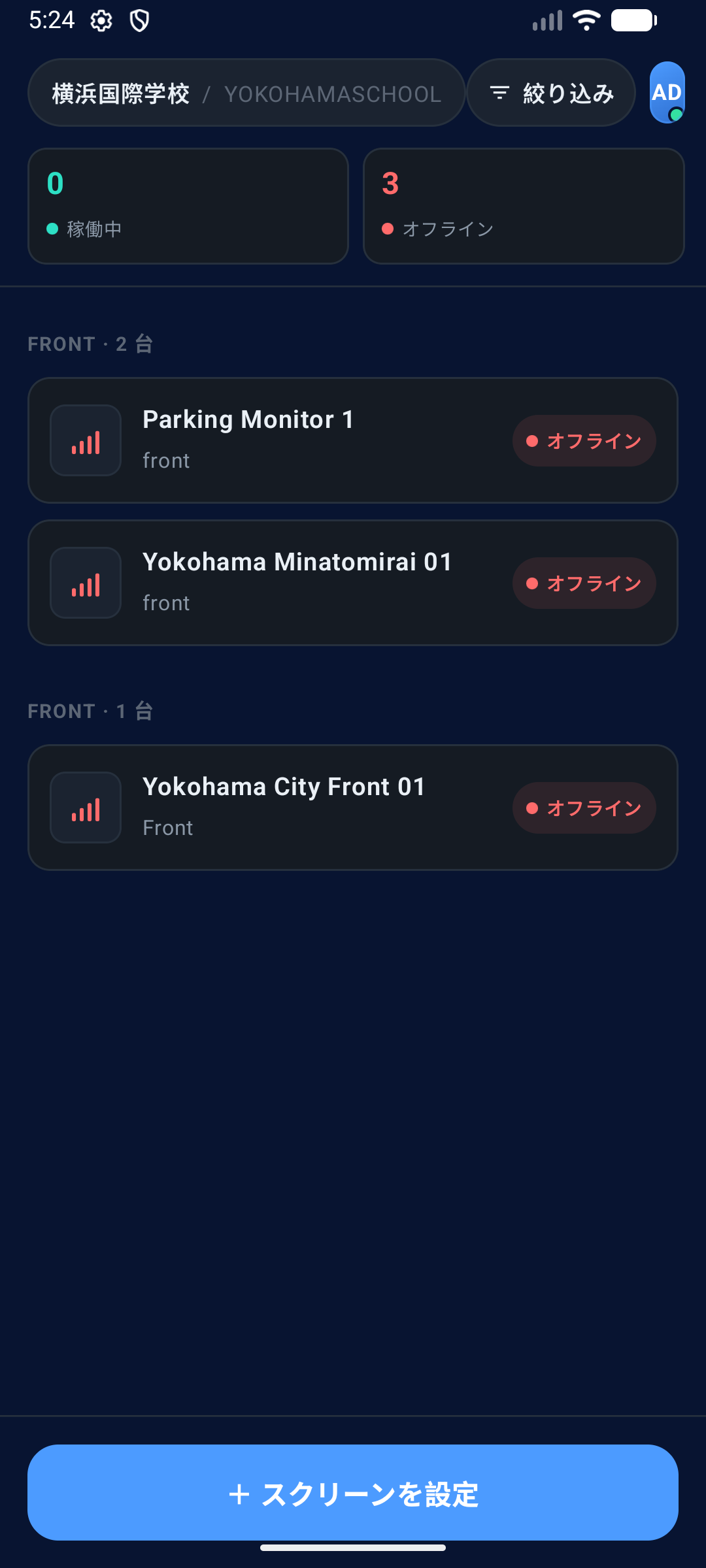
プレイヤーのQRをスキャンすれば、設置は完了。現場のスタッフが、その場でスクリーンの状態確認とセットアップを行えます。Scan the player's QR and the screen is set up — done. On-site staff can check screen status and pair new displays right from the floor.
あらゆる業種・環境に
対応します。
Built for every
display environment.
小売から交通、ホテルまで。PulseSignは、どんな現場でも力を発揮します。 From retail to transit to hospitality — PulseSign works everywhere.
小売・店舗Retail
Retail小売・店舗
プロモも価格改定も、全店舗へ一斉に。グループ配信とスケジュール機能で、売り場はいつも最新です。Push promotions and price changes to every store at once. Group targeting and scheduling keep the floor always current.
交通・駅・空港Transit
Transit交通・駅・空港
運行案内も、施設マップも、HTMLコンテンツでいつでも最新表示。緊急時は、全画面を一斉に切り替えられます。Departure info and wayfinding stay current with live HTML content. In an emergency, switch every screen at once.
ホテル・施設Hospitality
Hospitalityホテル・施設
イベント案内や館内情報を、ロビーの画面へ。時間帯スケジュールで、朝食案内からディナー告知まで自動で切り替わります。Bring events and guest info to lobby screens. Dayparting flips from breakfast hours to dinner promos automatically.
すぐに使えるドキュメント。
Everything you need
to get started.
セットアップから API 仕様まで、すべてここに。 From setup guides to full API reference — all in one place.
クイックスタートガイドQuick Start Guide
初期設定から最初の配信まで、わずか15分。手順どおりに進めるだけです。From setup to your first broadcast in just 15 minutes. Simply follow the steps.
ガイドを見る →Read guide →API Reference
コンテンツ・デバイス・スケジュールを操る、REST APIの完全リファレンス。A complete REST API reference for content, devices, and scheduling.
APIドキュメントを見る →View API docs →よくある質問FAQ
対応機種、ネットワーク要件、オフライン再生まで。よくある疑問に、すべてお答えします。Compatible devices, network requirements, offline playback — every common question, answered.
FAQを見る →Read FAQ →
その画面を、
動かしはじめよう。
Ready to put your
screens to work?
ご相談は無料です。まずは、メールアドレスをひとつ。 No commitment required. Just drop your email — we'll take it from there.
無料でご相談いただけます · No commitment required No commitment required · 無料でご相談いただけます